Requirements for recording streaming Internet audio: Windows 10 or any older version of Windows and an Internet connection
Requirements for recording any radio or an external audio source: Windows 10 or any older version of Windows and an audio cable to connect the audio source to the PC. Audio cables available for purchase (see Order page for details).
General PC Requirements: 32MB RAM and available hard drive space to save recordings. In other words, any computer with Microsoft Windows that was purchased in the past 10 years will work great.
Record Internet radio from any web site. Any audio from any website or Internet stream can be recorded.
Talk radio and music listeners: Record entire radio talk shows‚ or songs to your hard drive from any radio or satellite radio and make your own MP3s and CDs.
Convert old tapes, vinyl records‚ to digital format by connecting your tape / record player to the line-in jack of your computer. Recordings can be burned to CDs or DVDs.
Musicians: Record your instruments through the line-in jack or mic. Then use the Audio Editor to mix and edit multi-tracks.
Scanner & CB Radio Enthusiasts: Record your communications and remove the dead air with the Audio Editor software included.
Airports: Capture your air traffic and archive it for FAA requirements..
Management and Business and Government: Plug in a microphone and record meetings.
Sales People - Record telephone calls with a phone adapter (adapter not included).
Sales People - Record telephone calls with a phone adapter (adapter not included).
VOIP phone calls - Plug in your headset to the PC and record both parties of your VOIP calls.

PDMarq Audio Recorder is easy-to-use
(click image to enlarge)
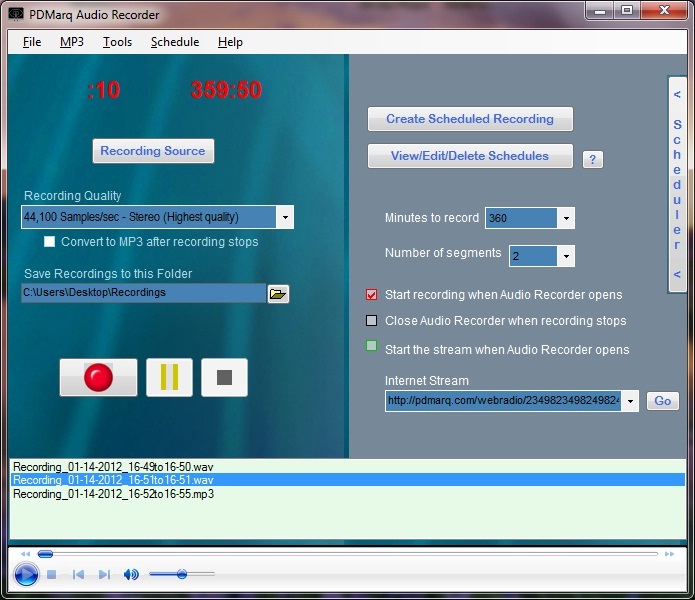 Very easy-to-use software:
Very easy-to-use software: Multiple levels of recording quality: CD, Radio, and Telephone quality PLUS options to record in stereo or mono.
Recording from your radio is easy: Connect an audio cable from your radio's headphone jack to the line-in or mic jack of your computer's sound card (the line-in jack will normally be located  next to the computer speakers jack.) and you can digitally record songs from the radio or your favorite talk radio shows or old vinyl records or audio tapes. Audio cables are available for purchase.
next to the computer speakers jack.) and you can digitally record songs from the radio or your favorite talk radio shows or old vinyl records or audio tapes. Audio cables are available for purchase. Features and Benefits
Schedule radio show recordings‚ with‚ automatic recording features‚
(like a VCR for your radio). Automatic file naming feature‚ and automatic saving feature‚ allows for multiple scheduled recordings.
Schedule radio show recordings‚ with‚ automatic recording features‚
(like a VCR for your radio). Automatic file naming feature‚ and automatic saving feature‚ allows for multiple scheduled recordings.
Record as many hours as you want depending on your available hard drive space. With old fashioned audio tapes, you can only record 2 hours, plus the tapes wear out quickly. Recording to your computer allows you to record ENTIRE radio shows in CD quality plus you can save the shows with out the expense of having to buy more tapes.
Fast forwarding through commercials is very easy when the show is recorded in digital format. Just slide the progress bar past the commercials. If you are archiving your favorite shows, you can permanently cut out the commercials with the included Audio Editor software.
Automatic Creation of Audio Segments enables you to create multiple files for lengthy recordings by selecting a pre-determined length for each audio segment. Each segment/file is created during the recording process.
Record from multiple sources: Line-in jack, microphone jack, streaming music/audio from the Internet, a CD in the CD drive, or any sound you hear on your computer.
Listen to the recorded audio on your computer or‚ portable media player or burn‚ to a CD for convenient listening anywhere.
High quality WAV recordings can‚ be converted to MP3 format with any MP3 encoder.
The Blade MP3 Encoder can be plugged into the PDMarq Audio Recorder:
Blade's MP3 encoding options: Bitrates: 32, 40, 48, 56, 64, 80, 96, 112, 128, 160, 192, 224, 256 and 320.‚ Other options: concat, nogap, crc, delete, mono, downmix stereo, leftmono, rightmono, swap, private, copyright, copy, quiet, outdir, priority, raw frequency, rawbits, rawmono, rawstereo, rawsigned, rawunsigned switch, rawbyteorder, rawchannels, progress indicator. Blade can be downloaded for free from various sites on the Internet. NOTE: Blade will only encode WAV files recorded at CD quality mode.
Blade's MP3 encoding options: Bitrates: 32, 40, 48, 56, 64, 80, 96, 112, 128, 160, 192, 224, 256 and 320.‚ Other options: concat, nogap, crc, delete, mono, downmix stereo, leftmono, rightmono, swap, private, copyright, copy, quiet, outdir, priority, raw frequency, rawbits, rawmono, rawstereo, rawsigned, rawunsigned switch, rawbyteorder, rawchannels, progress indicator. Blade can be downloaded for free from various sites on the Internet. NOTE: Blade will only encode WAV files recorded at CD quality mode.
 Schedule a recording when you are away from computer: Enter the audio stream address (or tune into the station on your radio), set the length of time to record and start time using the Task Scheduler to start the Audio Recorder at any time of the day..
 Record a radio show while you are away without having to leave your computer on all day:
With the Scheduled Tasks program (included with Windows), you can wake up your computer from Hibernate or Standby mode so you don't have to leave the computer on all day for a scheduled recording.
With the Scheduled Tasks program (included with Windows), you can wake up your computer from Hibernate or Standby mode so you don't have to leave the computer on all day for a scheduled recording.

Free bonus software, free upgrades
and free technical support!
and free technical support!
 Included for free is a Multi-Track‚ Audio Editor which has many features to enhance your recordings or existing audio files. Use it to edit your sounds using Cut, Copy and Paste (with unlimited Undo), mix tracks together, or apply effects to your recordings. It also has a built-in amplitude envelope editor, a customizable spectrogram mode and a frequency analysis window for audio analysis applications.
  Built-in effects include: Bass Boost, Wahwah, and Noise Removal, and it also supports VST plug-in effects. Some features include Amplify, Echo, Bass Boost, Noise Removal (great for those old tapes and vinyl albums),Time Shift, Reverse, Fade In, Fade Out, WahWah, Phaser, FreeVerb, Edit ID3 Tags. Supports mp3, WAV, AIFF, AU, IRCAM files. You can even make karaoke out of regular CDs or MP3 music‚ (removing vocals may not work with all music).
 Free upgrades: As more features are added, the price may increase‚ so buy PDMarq Audio Recorder today.
Free and fast‚ technical support: Available through email
Free and fast‚ technical support: Available through email


